Posts

Practical Examples: Firewall on Red Hat Linux

Firewall On Red Hat Linux To list all services available on the system: [root@linux ~]# firewall-cmd --get-services RH-Satellite-6 amanda-client bacula bacula-client cups dhcp dhcpv6 dhcpv6-client dns freeipa-ldap freeipa-ldaps freeipa-replication ftp high-availability http https imaps ipp ipp-client ipsec iscsi-target kerberos kpasswd ldap ldaps libvirt libvirt-tls mdns mountd ms-wbt mysql nfs ntp openvpn pmcd pmproxy pmwebapi pmwebapis pop3s postgresql proxy-dhcp radius rpc-bind rsyncd samba samba-client smtp ssh telnet tftp tftp-client transmission-client vdsm vnc-server wbem-https To list all zones available on the system: [root@linux ~]# firewall-cmd --get-zones block dmz drop external Home internal public trusted work.   To list the  default zone  of your system: [root@linux ~]# firewall-cmd --get-default-zone public To list  all the zones: [root@linux ~]# firewall-cmd --list-all-zones block interfaces: sources: services...
Cisco NSO (Tailf)

Image
 Installation of NCS/NSO Natively on a Linux * Install  Java 1.8: cisco@NSO:~$  sudo   apt install openjdk-8-jre cisco@NSO:~$   sudo   java -version java version "1.8.0_51" Java(TM) SE Runtime Environment (build 1.8.0_51-b16) Java HotSpot(TM) 64-Bit Server VM * Install ant: cisco@NSO:~$ sudo apt  install ant -y cisco@NSO:~$ ant -version Apache Ant(TM) version 1.9.6 compiled on July 20 2018 * Update System: cisco@NSO:~$   sudo   apt update * Install the NCS/NSO Software in a local directory cisco@NSO:~/nso-4.7.linux.x86_64$  sh nso-4.7.linux.x86_64.installer.bin $HOME/nsc-47/ * The installation program creates a shell script file named ncsrc in each NCS/NSO installation, which sets the environment variables. Source this file to get these settings in your shell. You may want to add this sourcing command to your login sequence, such as .bashrc. cisco@NSO:~$ source /home/cisco/nsc-47...

Cisco Nexus: Configuration VXLAN.

Image
Configuration VXLAN on Cisco Nexus !!! First: Legacy Method: Connect between two servers by Trunk VLAN: Second: VXLAN Method: Connect between two servers by VXLAN Tunnel. First Method:          NXOS-L:  vlan 2  interface Ethernet1/2     switchport access vlan 2     spanning-tree port type edge     no shutdown interface Ethernet1/1    switchport mode trunk    spanning-tree port type network    no shutdown NXOS-R: vlan 2 interface Ethernet1/2    switchport access vlan 2    spanning-tree port type edge    no shutdown interface Ethernet1/1    switchport mode trunk    spanning-tree port type network    no shutdown  Result: ------------------------------------------------------------------------------------------------- Second Method: VXLAN !! NXOS-L:...

Configure Firewall Policy on Cisco Router !!!

Image
Configure Firewall Policy on Cisco Router  to allow 80 & 443 and deny Other !!! Configured  Route between CLIENT and WEB_SERVER and running all services.  To Allow HTTP & HTTPS and deny others!!  1- Create Two Zones INPUT & OUTPUT 2- Create Class Map-Inspection 3- Create Policy Map --- Protocol Inspection 4- Create Zone Pair TEST: Allow HTTP & HTTPS From Client to Server: Deny Other services: ----------------------------------------------------------------------------------------------------------- Good Luck https://www.linkedin.com/in/ahmedms/

Firewall 101: FortiGate Labs

Image
FortiGate labs       1- Initial Configuration: Create Two Zone (INTERNAL (Port2) - OUTPUT (Port1)) 2- Create default route (static) between INTERNAL to WAN: 3-Rule Allow INTERNAL ZONE [PING & DNS] Services: 4- Rule Allow INTERNAL ZONE [http-https- DNS] Services and Deny [ping ] 5- Allow Security Profiles Anti-Virus profile : This EICAR and test download virus (.txt) ## Apply AV Profile: Result: 6- Apply Application Control for Block facebook.com & facebook services  for LAN Zone Edit Policy : 7- Block Facebook chat only for LAN Zone: -------------------------------------------------------------------------------------------------------------------- Good Luck https://www.linkedin.com/in/ahmedms/

The difference between VLANs and VLAN interfaces

Image
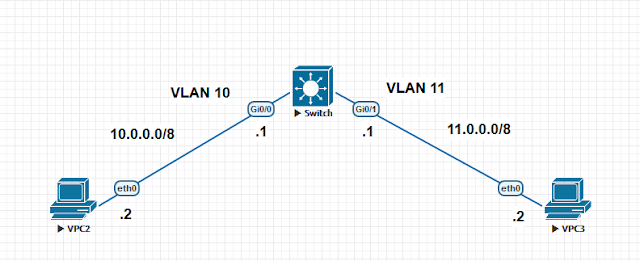
The difference between VLANs and VLAN interfaces   An SVI [   switched virtual interface ]  is normally found on switches (Layer 3 and Layer 2). With SVIs the switch recognizes the packet destinations that are local to the sending VLAN and switches those packets and packets destined for different VLANs are routed. Note:  An SVI cannot be activated unless the VLAN itself is created and at least one physical port is associated and active in that VLAN. Unless the VLAN is created there will be no spanning tree instance running hence the line protocol will be down for the SVI VLAN. SW: ! vlan 10-11 ! interface GigabitEthernet0/0  switchport access vlan 10  media-type rj45  negotiation auto ! interface GigabitEthernet0/1  switchport access vlan 11  media-type rj45  negotiation auto ! ! interface Vlan10  ip address 10.0.0.1 255.0.0.0 ! interface Vlan11  ip address 1...