Posts

DevNet 105: Network Automation Using Nornir

Image
Network Automation Using Nornir : Topology: Create hosts.yaml file: --- IOSv-L2-1: hostname: '192.168.17.3' port: 22 username: 'admin' password: 'cisco' platform: 'cisco_ios' groups: - 'cisco_ios' IOSv-L2-2: hostname: '192.168.17.4' port: 22 username: 'admin' password: 'cisco' platform: 'cisco_ios' groups: - 'cisco_ios' Create group.yaml file: --- # groups.yaml file cisco_ios: platform: 'cisco_ios' First Lab  by Nornir: Create simple python script: from nornir import InitNornir nr = InitNornir() Now let's  execute Python program and inspect the inventory:  root@kali:/home/nornir# python3 -m pdb simple_test.py > /home/nornir/simple_test.py(1)<module>() -> from nornir import InitNornir (Pdb) list 1 -> from nornir import InitNornir 2 nr = InitNornir() [EOF] (Pdb) n...

DevNet 104: Network Automation Using NAPALM

Image
Network Automation Using Napalm : Topology: Configure router to using napalm libraries: ## Cisco IOS hostname ESW1 ip domain name cloud.me crypto key generate rsa How many bits in the modulus [512]: 1024/2048 ip ssh version 2 ! aaa new-model aaa authentication login default local aaa authorization exec default local ! username admin privilege 15 secret cisco ! line vty 0 4 transport input ssh ! ! for testing only: no authentication on console aaa authentication login no_auth none line con 0 privilege level 15 login authentication no_auth archive path flash: ! ip scp server enable Configure OSPF by python library (NAPALM): 1-  Router ESW1: import json import napalm driver = napalm.get_network_driver('ios') optional_args = {} optional_args['secret'] = 'cisco' device = driver('192.168.23.100', 'admin', 'cisco', optional_args=optional_args) device.open() print('Accessing Router: 192.168.23.100') devi...

DevNet 103: Network Automation Using Python

Image
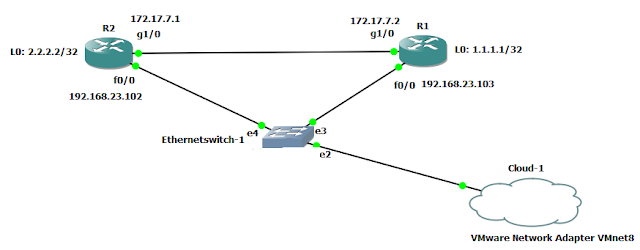
 Configure OSPF on Cisco Router by Python Configure R1: import paramiko import time import getpass ip_address = "192.168.23.103" username = raw_input("Enter your username of : " + ip_address + ": ") password = getpass.getpass() ssh_client = paramiko.SSHClient() ssh_client.set_missing_host_key_policy(paramiko.AutoAddPolicy()) ssh_client.connect(hostname=ip_address,username=username,password=password) print "Successful connection " + ip_address remote_connection = ssh_client.invoke_shell() print "Configure OSPF " remote_connection.send('en\n') time.sleep(1) recv = remote_connection.recv(9999) remote_connection.send('cisco\n') time.sleep(1) recv = remote_connection.recv(9999) remote_connection.send("configure terminal\n") remote_connection.send("interface loop 0\n") remote_connection.send("ip address 1.1.1.1 255.255.255.0\n") remote_connection.send("interface g1/0\n...

DevNet 102: Network Automation Using Python

Image
                        How to add  vlans on Multi-Switches  by python Add commands to two switches: ip name-server 8.8.8.8 ip domain name cloud.me username ahmed password cisco enable password cisco line vty 0 4 login local transport input all exit crypto key generate rsa ip ssh version 2 Create text file contain IPs of switches: root@kali:/home# vim myswitches.txt 192.168.23.100 192.168.23.101 Add VLANs on two switches by python script: import paramiko import time import getpass # Open file with list of switches f = open("myswitches.txt") # enter to each switch and configure it: for line in f: ip_address = line.strip() username = raw_input("Enter your username of : " + ip_address + ": ") password = getpass.getpass() ssh_client = paramiko.SSHClient() ssh_client.set_missing_host_key_policy(paramiko.AutoAddPolicy()) ssh_client.connect(hostname=ip_address,use...

DevNet 101: Network Automation Using Python

Image
How to add  vlans on one switch by python Add VLANs on ESW1 by python script: import paramiko import time ip_address = "192.168.23.101" username = "ahmed" password = "cisco" ssh_client =paramiko.SSHClient() ssh_client.set_missing_host_key_policy(paramiko.AutoAddPolicy()) ssh_client.connect(hostname=ip_address,username=username,password=password) print "Successful connection", ip_address remote_connection = ssh_client.invoke_shell() remote_connection.send('en\n') time.sleep(1) recv = remote_connection.recv(9999) remote_connection.send('cisco\n') time.sleep(1) recv = remote_connection.recv(9999) remote_connection.send("configure terminal\n") remote_connection.send("interface loop 0\n") remote_connection.send("ip address 1.1.1.1 255.255.255.255\n") remote_connection.send("interface loop 1\n") remote_connection.send("ip address 2.2.2.2 255.255.255.255\n") remote_co...

Kubernetes 102: Exposing an External IP Address to Access an Application in a Cluster

Image
Get kubernetes nodes : k3os-3249 [~]$ kubectl get nodes NAME STATUS ROLES AGE VERSION k3os-22710 Ready <none> 10m v1.14.1-k3s.4 k3os-3249 Ready <none> 17h v1.14.1-k3s.4 Get cluster info: k3os-3249 [~]$ kubectl cluster-info Kubernetes master is running at https://localhost:6443 CoreDNS is running at https://localhost:6443/api/v1/namespaces/kube-system/services/kube-dns:dns/proxy Creating a service for an application running in two pods: k3os-3249 [ ~ ]$ kubectl run --generator=run-pod/v1 hello-world --replicas=2 --labels="run=load-balancer-example" --image=gcr.io/google-samples/node-hello:1.0 --port=8080 deployment.apps/hello-world created Display information about the Deployment: k3os-3249 [/kubernetes]$ kubectl get all NAME READY STATUS RESTARTS AGE pod/hello-world-68ff65cf7-bxg6j 0/1 ContainerCreating 0 29s pod/hello-world-68ff6...