Posts

Firewall 101: FortiGate Labs

Image
FortiGate labs       1- Initial Configuration: Create Two Zone (INTERNAL (Port2) - OUTPUT (Port1)) 2- Create default route (static) between INTERNAL to WAN: 3-Rule Allow INTERNAL ZONE [PING & DNS] Services: 4- Rule Allow INTERNAL ZONE [http-https- DNS] Services and Deny [ping ] 5- Allow Security Profiles Anti-Virus profile : This EICAR and test download virus (.txt) ## Apply AV Profile: Result: 6- Apply Application Control for Block facebook.com & facebook services  for LAN Zone Edit Policy : 7- Block Facebook chat only for LAN Zone: -------------------------------------------------------------------------------------------------------------------- Good Luck https://www.linkedin.com/in/ahmedms/
The difference between VLANs and VLAN interfaces

Image
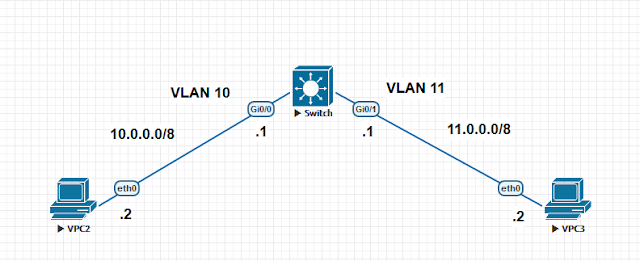
The difference between VLANs and VLAN interfaces   An SVI [   switched virtual interface ]  is normally found on switches (Layer 3 and Layer 2). With SVIs the switch recognizes the packet destinations that are local to the sending VLAN and switches those packets and packets destined for different VLANs are routed. Note:  An SVI cannot be activated unless the VLAN itself is created and at least one physical port is associated and active in that VLAN. Unless the VLAN is created there will be no spanning tree instance running hence the line protocol will be down for the SVI VLAN. SW: ! vlan 10-11 ! interface GigabitEthernet0/0  switchport access vlan 10  media-type rj45  negotiation auto ! interface GigabitEthernet0/1  switchport access vlan 11  media-type rj45  negotiation auto ! ! interface Vlan10  ip address 10.0.0.1 255.0.0.0 ! interface Vlan11  ip address 1...

Configure MPLS L2 VPN (VPLS) between two branches !!!

Image
Configuration MPLS L2 VPN (VPLS) between two branches !!! Your tasks are: 1- R2(f0/0) not assign IP   R5(f0/1) no assign IP. 2- Apply routing protocol RIP v2 on R1 & R6 . 3- Apply OSPF on R2-R3-R4-R5, but R2 (23.0.0.0 & 2.2.2.2) no route with 16.0.0.0  and    R6 the same. 4- Company has two branches (16.0.0.1  -   16.0.0.6) 5- MPLS not need know network of customers into PE & P,  so customer network not need route   into core. R1: en conf t interface f0/0 no shutdown ip address 16.0.0.1 255.0.0.0 interface loopback 0 ip address 1.1.1.1 255.255.255.255 router rip network 16.0.0.0   network 1.0.0.0    version 2 no auto-summary end wr me --------------- R2: en conf t mpls ip interface f0/1 no shutdown ip address 23.0.0.3 255.0.0.0 mpls ip interface loopback 0 ip address 2.2.2.2 255.255.255.255 router ospf 1 network 23.0.0.0...

Ansible 101: Configuration LVM on Linux !!!

Image
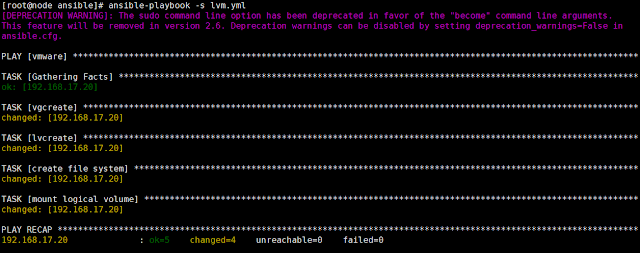
How to Configure LVM on Linux by Ansible: 1- Install ansible on Centos:   [root@cloud ~]#   yum install -y ansible 2- create inventory hosts:  [root@cloud ~]# vim /etc/ansible/hosts           [vmware]           192.168.17.20 Note: We need  Create LVM on one  machine. can add any IPs of machines in hosts file 3- Create YAML file: [root@cloud ansible]# vim /etc/ansible/lvm.yaml ######### ---  - hosts: vmware    user: root    tasks:    - name: vgcreate      lvg:       vg: vgdata       pvs: /dev/sdb1    - name: lvcreate      lvol:       vg: vgdata       lv: dataone       size: 1500M    - name: create file system      filesystem:       fstype: ext4       dev: /dev/vgda...

Configuration OSPF Protocol on HPE OS Comware Routers.

Image
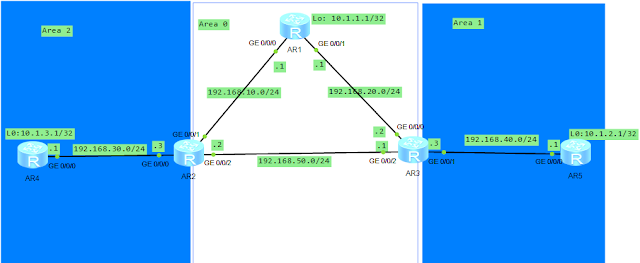
Configuration OSPF Protocol on HPE OS Comware Routers . R1: #  sysname AR1 # interface GigabitEthernet0/0/0  ip address 192.168.10.1 255.255.255.0  # interface GigabitEthernet0/0/1  ip address 192.168.20.1 255.255.255.0  # interface GigabitEthernet0/0/2 # interface NULL0 # interface LoopBack0  ip address 10.1.1.1 255.255.255.255  # ospf 1   area 0.0.0.0    network 192.168.10.0 0.0.0.255    network 192.168.20.0 0.0.0.255  # return R2: [V200R003C00] #  sysname AR2 #  snmp-agent local-engineid 800007DB03000000000000  snmp-agent  #  clock timezone China-Standard-Time minus 08:00:00 # portal local-server load portalpage.zip #  drop illegal-mac alarm #  set cpu-usage threshold 80 restore 75 # aaa   authentication-scheme default  authorization-scheme default  accounting-scheme default  domain default  ...

Configuration RIP Protocol on HPE Comware Routers

Image
Configuration RIP Protocol on HPE Comware Routers!! ## Redistribution static route into RIP domain: ## RIP can be send update route by encryption between routers      for example:        R2 <------> R4   authentication password (pass) # No route with R2 because R4 authentication and R4 not authentication ------------------------------------------------------------------------------------------------------------------- Good Luck https://www.linkedin.com/in/ahmedms/